Crypto payments are live · Save 5% when you pay with cryptoCrypto payments are live · Get 5% offReal accountsNo password needed30-day refill guarantee
;} %3C/style%3E%3Cpath class='st0' d='M89.7,52c-2.9,0.1-5.8-0.5-8.4-1.6c-2.1-0.9-4-2.5-5.2-4.4c-1.2-1.9-1.8-4.1-1.8-6.4h7.2c0,1,0.3,2,0.8,2.9 c0.6,1,1.6,1.8,2.7,2.3c1.5,0.6,3.1,0.9,4.8,0.9c1.5,0.1,3.1-0.2,4.5-0.8c1.1-0.4,2-1.1,2.7-2c0.6-0.8,0.9-1.8,0.9-2.9 c0-1.3-0.6-2.5-1.7-3.2c-1.6-1-3.4-1.5-5.3-1.5L87.4,35c-3.2-0.1-6.2-1.3-8.6-3.4c-2.2-2-3.3-4.8-3.2-7.7c-0.1-2.2,0.5-4.4,1.7-6.2 c1.2-1.8,2.8-3.1,4.8-4c4.7-1.9,9.9-1.9,14.6,0.1c2,0.9,3.6,2.4,4.8,4.2c1.2,1.9,1.7,4.1,1.7,6.4H96c0-1-0.2-2-0.7-2.8 c-0.5-0.9-1.3-1.7-2.3-2.1c-1.2-0.6-2.5-0.9-3.8-0.8c-1.2,0-2.5,0.2-3.6,0.8c-0.9,0.4-1.6,1.1-2.1,2C83,22.1,82.8,23,82.8,24 c0,1.1,0.5,2.2,1.3,3c1.1,1,2.6,1.5,4.1,1.5l3.2,0.3c2.4,0.1,4.8,0.7,7.1,1.7c1.9,0.8,3.5,2.1,4.7,3.8c1.2,1.7,1.8,3.7,1.7,5.7 c0,2.2-0.6,4.4-1.9,6.3c-1.3,1.9-3.2,3.3-5.3,4.2C95.2,51.5,92.4,52.1,89.7,52z'/%3E%3Cpath class='st0' d='M124.3,52c-2.2,0-4.5-0.4-6.6-1.2c-1.8-0.7-3.4-1.8-4.8-3.2c-1.3-1.3-2.3-2.9-2.9-4.6c-0.7-1.7-1-3.6-1-5.4 v-1.1c0-1.9,0.3-3.8,1-5.5c1.4-3.6,4.3-6.4,7.9-7.8c2-0.8,4.2-1.2,6.4-1.2c2.2,0,4.4,0.4,6.4,1.2c1.8,0.7,3.5,1.8,4.8,3.2 c1.3,1.3,2.3,2.9,3,4.6c0.7,1.7,1,3.6,1,5.5v1.1c0,1.9-0.3,3.7-1,5.4c-0.7,1.7-1.7,3.3-3,4.6c-1.4,1.4-3,2.5-4.8,3.2 C128.7,51.6,126.5,52,124.3,52z M124.3,45.9c1.5,0.1,3.1-0.4,4.4-1.2c1.2-0.8,2.2-1.9,2.8-3.1c0.7-1.4,1-3,0.9-4.5 c0-1.6-0.3-3.1-1-4.5c-0.6-1.3-1.6-2.4-2.8-3.2c-1.3-0.8-2.8-1.2-4.3-1.2c-1.5,0-3.1,0.4-4.4,1.2c-1.2,0.8-2.2,1.9-2.8,3.2 c-0.7,1.4-1,3-1,4.5c0,1.6,0.3,3.1,1,4.5c0.6,1.3,1.6,2.4,2.8,3.1C121.2,45.5,122.7,45.9,124.3,45.9L124.3,45.9z'/%3E%3Cpath class='st0' d='M157.1,52c-2.2,0-4.3-0.4-6.3-1.2c-1.7-0.8-3.2-1.9-4.4-3.3c-1.2-1.4-2.1-3-2.6-4.7c-0.6-1.7-0.9-3.5-0.9-5.3 v-1c0-1.9,0.3-3.7,0.9-5.4c0.6-1.7,1.5-3.3,2.7-4.6c1.2-1.4,2.7-2.5,4.4-3.2c4.1-1.7,8.7-1.6,12.8,0.2c1.9,0.9,3.5,2.2,4.6,3.9 c1.2,1.7,1.8,3.8,1.9,5.9h-7c-0.2-1.4-0.8-2.6-1.8-3.6c-1.2-1-2.8-1.6-4.3-1.5c-1.4,0-2.7,0.4-3.9,1.1c-1.1,0.8-1.9,1.9-2.4,3.1 c-0.5,1.5-0.8,3-0.8,4.5c0,1.5,0.2,3.1,0.8,4.5c0.4,1.3,1.2,2.4,2.3,3.2c1.2,0.8,2.6,1.2,4,1.1c1.1,0,2.2-0.2,3.2-0.7 c0.9-0.4,1.6-1.1,2.1-1.9c0.6-0.8,0.9-1.7,1-2.7h7c-0.1,2.1-0.8,4.2-2,6c-1.2,1.7-2.8,3.1-4.7,4C161.7,51.6,159.4,52.1,157.1,52z'/%3E%3Cpath class='st0' d='M172.4,28.4V23h11.1v5.4L172.4,28.4z M178.9,19.7c-1.1,0.1-2.3-0.3-3.1-1.1c-0.7-0.8-1-1.8-1-2.8 c0-1,0.3-2,1-2.8c0.8-0.8,2-1.2,3.1-1.1c1.1-0.1,2.3,0.3,3.1,1.1c0.7,0.8,1,1.8,1,2.8c0,1-0.3,2-1,2.8 C181.2,19.4,180,19.8,178.9,19.7z M176.3,51V23h7.2v28H176.3z'/%3E%3Cpath class='st0' d='M197.7,51.7c-1.8,0-3.6-0.3-5.3-1.1c-1.5-0.7-2.7-1.7-3.5-3.1c-0.9-1.5-1.3-3.1-1.3-4.8 c-0.1-1.8,0.4-3.6,1.5-5.1c1.1-1.4,2.6-2.4,4.3-2.9c2.1-0.7,4.3-1,6.5-1h6.4V38h-6.6c-1.4-0.1-2.7,0.3-3.8,1.2 c-1.7,1.7-1.8,4.4-0.1,6.1c0,0,0.1,0.1,0.1,0.1c1.1,0.9,2.4,1.3,3.8,1.2c0.9,0,1.9-0.2,2.8-0.5c0.9-0.4,1.6-1,2.1-1.8 c0.6-1.1,0.9-2.3,0.9-3.6l1.8,2c-0.1,1.8-0.6,3.5-1.4,5c-0.7,1.3-1.9,2.4-3.2,3.1C201.2,51.4,199.4,51.8,197.7,51.7z M206.7,51v-8.3 h-1.2v-9.2c0.1-1.3-0.3-2.6-1.2-3.6c-1-0.9-2.3-1.3-3.6-1.2c-0.9,0-1.9,0-3.1,0l-3.6,0.1c-1.2,0.1-2.3,0.1-3.3,0.2v-6l2.6-0.2 c1-0.1,2-0.1,3.1-0.1s2.1,0,3,0c2.4-0.1,4.9,0.3,7.2,1.1c1.8,0.7,3.3,1.9,4.3,3.5c1.1,2,1.6,4.2,1.5,6.4V51L206.7,51z'/%3E%3Cpath class='st0' d='M215.3,18.7v-5.4H226v5.4H215.3z M218.8,51V13.4h7.2V51H218.8z'/%3E%3Cpath class='st1' d='M232.8,51V13.1h7.3V51H232.8z M239.1,39.5v-6.3h7.3c1.3,0,2.6-0.3,3.7-0.9c1-0.6,1.8-1.4,2.4-2.4 c0.6-1.1,0.8-2.3,0.8-3.5c0-1.3-0.3-2.5-0.8-3.6c-0.5-1-1.3-1.8-2.4-2.4c-1.1-0.6-2.4-0.9-3.7-0.9h-7.3v-6.3h6.7 c2.8-0.1,5.5,0.4,8.1,1.5c2.1,0.9,3.9,2.5,5.1,4.4c1.2,2.1,1.8,4.4,1.8,6.8v0.8c0.1,2.4-0.5,4.7-1.8,6.8c-1.2,2-3,3.5-5.1,4.4 c-2.5,1.1-5.3,1.6-8.1,1.5L239.1,39.5z'/%3E%3Cpath class='st1' d='M271.8,51.7c-1.8,0-3.6-0.3-5.3-1.1c-1.5-0.7-2.7-1.7-3.5-3.1c-0.9-1.5-1.3-3.1-1.3-4.8 c-0.1-1.8,0.4-3.6,1.5-5.1c1.1-1.4,2.6-2.4,4.3-2.9c2.1-0.7,4.3-1,6.5-1h6.4V38h-6.5c-1.4-0.1-2.7,0.3-3.8,1.2 c-1.7,1.7-1.8,4.4-0.1,6.1c0,0,0.1,0.1,0.1,0.1c1.1,0.9,2.4,1.3,3.8,1.2c0.9,0,1.9-0.2,2.8-0.5c0.9-0.4,1.6-1,2.1-1.8 c0.6-1.1,0.9-2.3,0.9-3.6l1.8,2c-0.1,1.8-0.6,3.5-1.4,5c-0.7,1.3-1.9,2.4-3.2,3.1C275.2,51.4,273.5,51.8,271.8,51.7z M280.8,51v-8.3 h-1.2v-9.2c0.1-1.3-0.3-2.6-1.2-3.6c-1-0.9-2.3-1.3-3.6-1.2c-0.9,0-1.9,0-3.1,0l-3.6,0.1c-1.2,0.1-2.3,0.1-3.3,0.2v-6l2.6-0.2 c1-0.1,2-0.1,3.1-0.1s2.1,0,3,0c2.4-0.1,4.9,0.3,7.2,1.1c1.8,0.7,3.3,1.9,4.3,3.6c1.1,2,1.6,4.2,1.5,6.4V51L280.8,51z'/%3E%3Cpath class='st1' d='M292.6,51V23h5.7v12h-0.5c-0.1-2.4,0.3-4.9,1.1-7.1c0.6-1.8,1.8-3.3,3.4-4.3c1.7-1,3.6-1.5,5.6-1.5h0.3 c3.3,0,5.9,1.1,7.6,3.2s2.6,5.4,2.6,9.6v16h-7.2V34.3c0.1-1.5-0.5-3-1.5-4.2c-1-1.1-2.5-1.7-4-1.6c-1.6-0.1-3.1,0.5-4.3,1.6 c-1.1,1.2-1.7,2.7-1.6,4.3V51H292.6z'/%3E%3Cpath class='st1' d='M336.2,51.9c-1.9,0-3.7-0.3-5.4-1.1c-1.6-0.7-3.1-1.7-4.3-3c-1.2-1.3-2.2-2.9-2.8-4.6c-0.7-1.8-1-3.7-1-5.7 v-1.1c0-1.9,0.3-3.8,0.9-5.6c0.6-1.7,1.5-3.3,2.7-4.6c1.2-1.3,2.6-2.4,4.2-3.1c1.7-0.8,3.6-1.1,5.4-1.1c2,0,4,0.4,5.8,1.4 c1.7,1,3.1,2.5,4,4.2c1.1,2.2,1.6,4.7,1.6,7.1l-2.1-2.4V13.4h7.2V51h-5.7V39.2h1.3c0,2.5-0.6,4.9-1.8,7.1c-1,1.8-2.4,3.3-4.2,4.3 C340.2,51.5,338.2,52,336.2,51.9z M337.8,45.9c1.3,0,2.7-0.3,3.9-1c1.2-0.7,2.1-1.6,2.8-2.8c0.7-1.3,1.1-2.8,1.1-4.3v-2.1 c0-1.5-0.3-2.9-1.1-4.1c-0.7-1.1-1.7-2-2.8-2.6c-1.2-0.6-2.5-0.9-3.8-0.9c-1.4,0-2.9,0.4-4.1,1.1c-1.2,0.8-2.2,1.8-2.8,3.1 c-0.7,1.5-1,3.1-1,4.7c0,1.6,0.3,3.2,1,4.7c0.6,1.3,1.6,2.3,2.8,3.1C334.9,45.6,336.3,45.9,337.8,45.9L337.8,45.9z'/%3E%3Cpath class='st1' d='M367,51.7c-1.8,0-3.6-0.3-5.3-1.1c-1.5-0.7-2.7-1.7-3.5-3.1c-0.9-1.5-1.3-3.1-1.3-4.8c-0.1-1.8,0.4-3.6,1.5-5.1 c1.1-1.4,2.6-2.4,4.3-2.9c2.1-0.7,4.3-1,6.5-1h6.4V38H369c-1.4-0.1-2.7,0.3-3.8,1.2c-1.7,1.7-1.8,4.4-0.1,6.1c0,0,0.1,0.1,0.1,0.1 c1.1,0.9,2.4,1.3,3.8,1.2c0.9,0,1.9-0.2,2.8-0.5c0.9-0.4,1.6-1,2.1-1.8c0.6-1.1,0.9-2.3,0.9-3.6l1.8,2c-0.1,1.8-0.6,3.5-1.4,5 c-0.7,1.3-1.8,2.3-3.1,3C370.4,51.4,368.7,51.8,367,51.7z M376,51v-8.3h-1.2v-9.2c0.1-1.3-0.3-2.6-1.2-3.6c-1-0.9-2.3-1.3-3.6-1.2 c-0.9,0-1.9,0-3.1,0l-3.6,0.1c-1.2,0.1-2.3,0.1-3.3,0.2v-6l2.7-0.2c1-0.1,2-0.1,3.1-0.1s2.1,0,3,0c2.4-0.1,4.9,0.3,7.2,1.1 c1.8,0.7,3.3,1.9,4.3,3.6c1.1,2,1.6,4.2,1.5,6.4V51L376,51z'/%3E%3Cg id='_Group_'%3E%3Cpath class='st0' d='M23.3,0h17.3c12.9,0,23.3,10.4,23.3,23.3v17.3c0,12.9-10.4,23.3-23.3,23.3H23.3C10.4,63.9,0,53.4,0,40.6V23.3 C0,10.4,10.4,0,23.3,0z'/%3E%3C/g%3E%3Cg id='_Group_2'%3E%3Cpath class='st2' d='M63.9,35.7v4.9c0,12.9-10.4,23.3-23.3,23.3H29L11.5,46.3L52,24L63.9,35.7z'/%3E%3C/g%3E%3Cpath class='st1' d='M31.9,52.8c-7,0-12.2-1-16.1-3.1c-2.4-1.2-4.4-3-5.8-5.3c-1.5-2.5-2.2-5.3-2.1-8.2c0-6,2.6-11.8,7.2-15.8 c4.6-4.2,10.7-6.4,16.9-6.4c6.2,0,12.2,2.2,16.9,6.4c4.5,4,7.2,9.7,7.2,15.8c0.1,2.9-0.7,5.7-2.1,8.2c-1.4,2.3-3.4,4.1-5.8,5.3 C44.2,51.7,38.9,52.8,31.9,52.8z'/%3E%3ClinearGradient id='SVGID_1_' gradientUnits='userSpaceOnUse' x1='18.6133' y1='42.5239' x2='46.8733' y2='18.1239' gradientTransform='matrix(1 0 0 -1 0 66)'%3E%3Cstop offset='0' style='stop-color:%23FFFFFF'/%3E%3Cstop offset='0.57' style='stop-color:%23FDFDFD'/%3E%3Cstop offset='0.84' style='stop-color:%23F5F5F5'/%3E%3Cstop offset='1' style='stop-color:%23ECECEC'/%3E%3C/linearGradient%3E%3Cpath class='st3' d='M52.4,36.1c0,10.2-9.1,13-20.4,13s-20.4-2.8-20.4-13s9.1-18.5,20.4-18.5S52.4,25.9,52.4,36.1z'/%3E%3Cpath class='st1' d='M36.2,40.3c0,1.5-1.9,2.8-4.2,2.8s-4.2-1.3-4.2-2.8s1.9-1.9,4.2-1.9S36.2,38.8,36.2,40.3z'/%3E%3Cpath class='st1' d='M44.2,28.9c-2.8-2.8-6.6-3.5-8.4-1.7s0,4.5,2.8,7.3s5.5,4.7,7.3,2.8S47,31.7,44.2,28.9z'/%3E%3Cpath class='st1' d='M50.9,13.4c-3.6-2.8-8.1-3.1-10-0.7s0.7,5.2,4.3,8s7,4.5,8.8,2.1S54.5,16.2,50.9,13.4z'/%3E%3Cpath class='st1' d='M13,13.4c3.6-2.8,8.1-3.1,10-0.7s-0.7,5.2-4.3,8s-7,4.5-8.8,2.1S9.3,16.2,13,13.4z'/%3E%3Cpath class='st1' d='M19.6,28.9c-2.8,2.8-3.5,6.6-1.7,8.4s4.5,0,7.3-2.8s4.6-5.5,2.8-7.3S22.4,26.1,19.6,28.9z'/%3E%3C/svg%3E)
30-day refill guaranteeNo password needed
30-day refill guaranteeNo password needed
Client portal
See the live status of each service, chat with our team on any order, and keep every invoice in one place. It works in your browser and as an app on your phone.
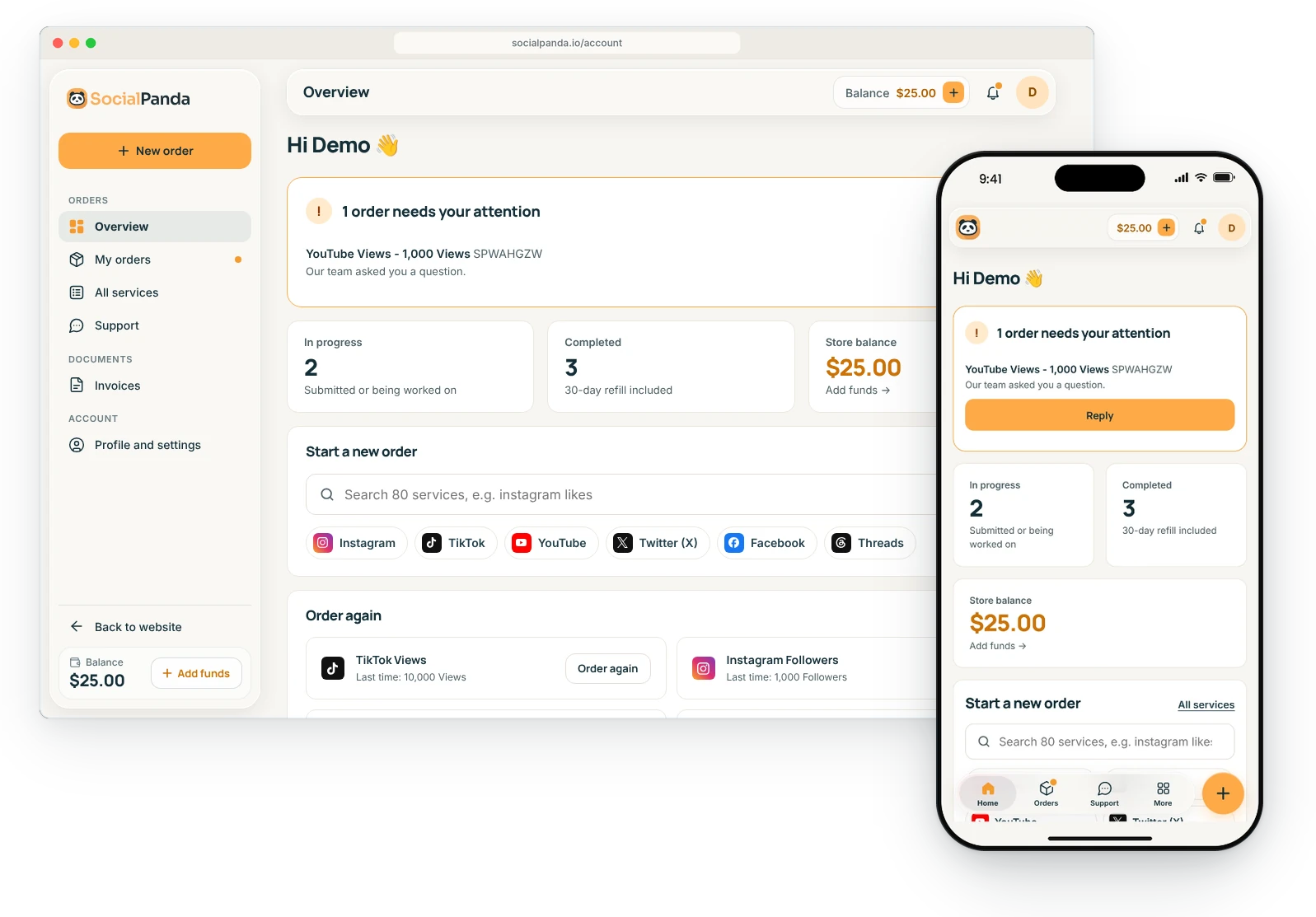
No sign-up form. Your dashboard is ready the moment you place your first order.
Pick a service, add your link and pay by card or crypto. We create your account with your email.
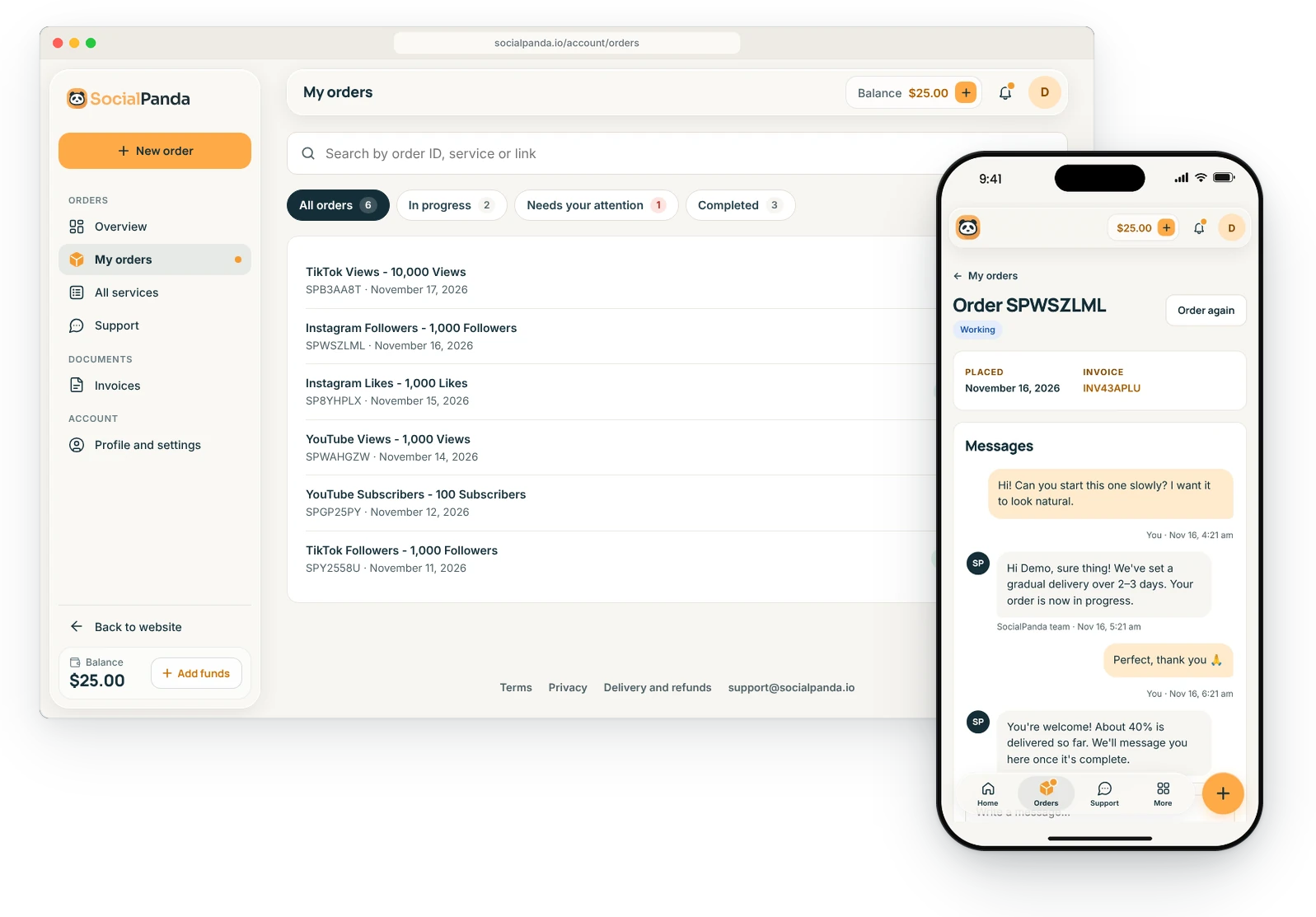
Each service gets its own order with a clear status, from Submitted to Working to Completed.
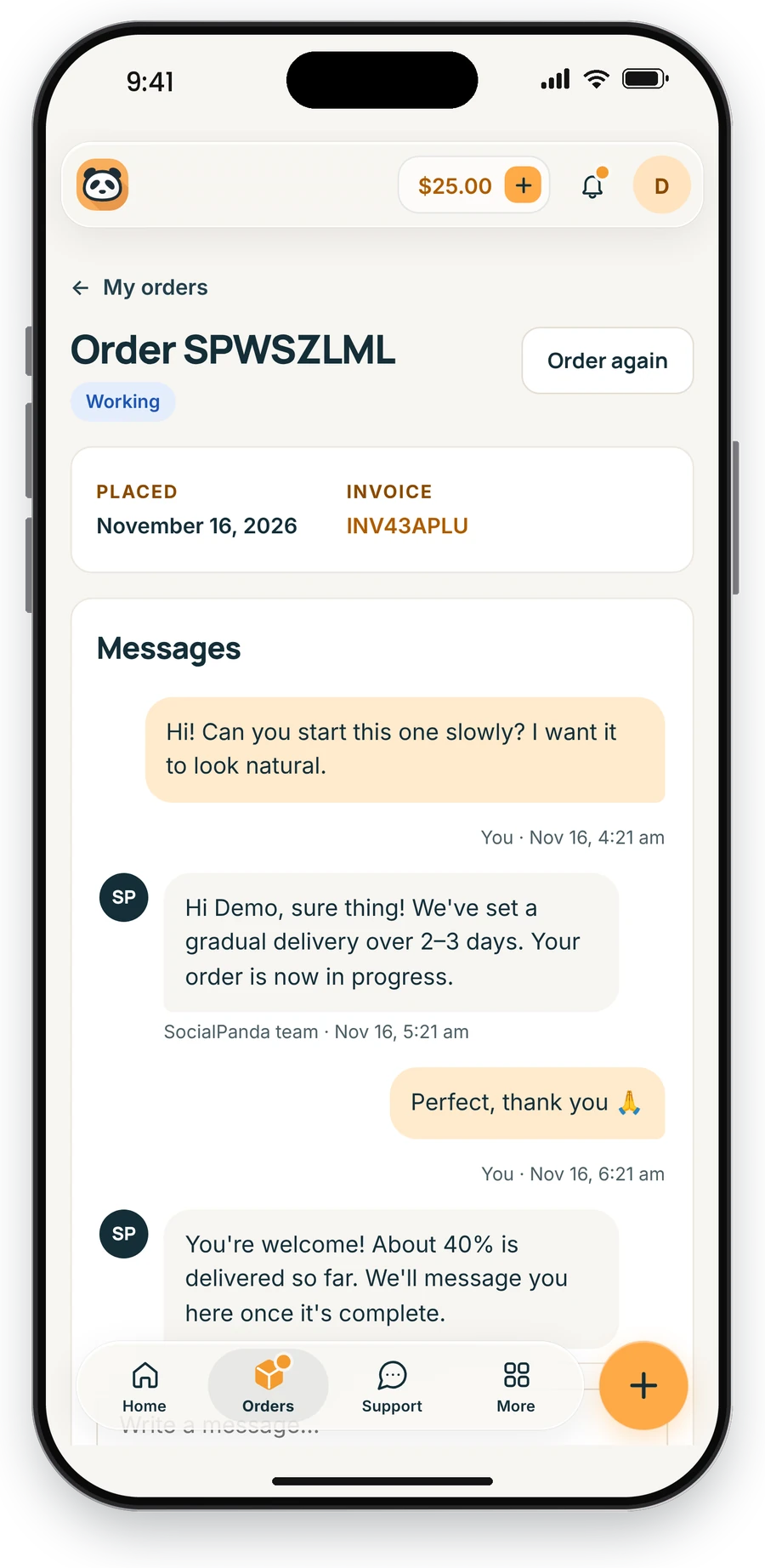
Questions or a wrong link? Message us right on the order and we reply there.
Order tracking
Buy three services and you get three orders, each with its own ID and status. Filter by In progress, Needs your attention or Completed, and search by order ID, service or link.
Chat support
Each order has its own conversation, so nothing gets lost in email threads. Send screenshots, fix a link, or ask how delivery is going. For anything else, open a support ticket.
The tools you’d expect from a proper platform, built into every SocialPanda account.
Status changes, team replies and balance updates under the bell, with important ones by email.
Download any invoice as a PDF. Add your company name, address and tax ID once and they show on every invoice.
Open a ticket for anything that isn’t about one order, with files attached.
Repeat a past order in a couple of taps, with the same service and package.
Find any order by its ID, the service or the link you used.
A 6-digit code or one-click link by email. No password needed.
Store balance
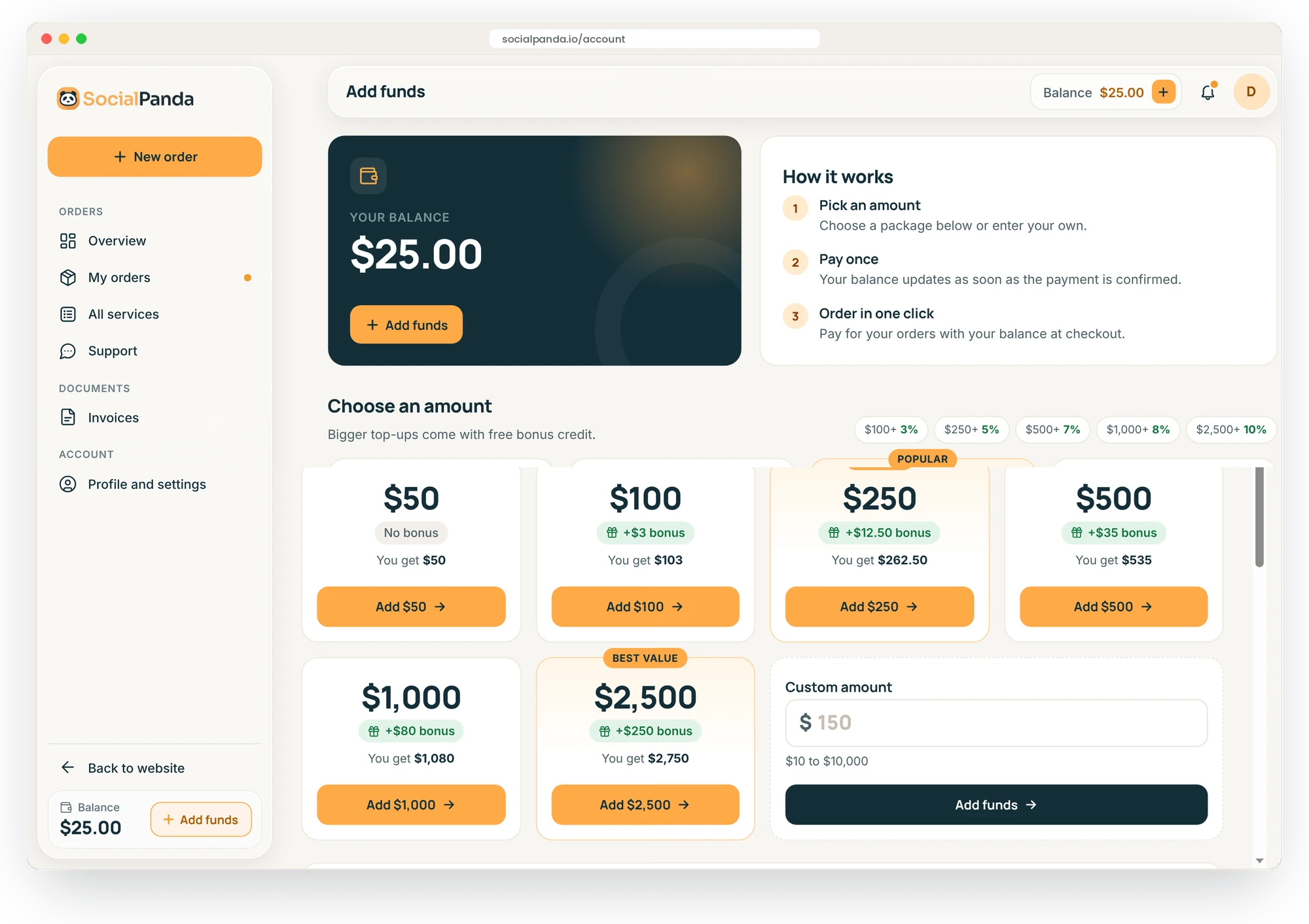
Add funds to your account and pay for orders with your balance at checkout. Bigger top-ups come with free bonus credit, up to 10% extra, and every top-up and payment is listed in your balance history.
Phone app
On your phone the dashboard opens full screen like an app, with a simple bottom menu and a New order button always in reach. No app store download needed.
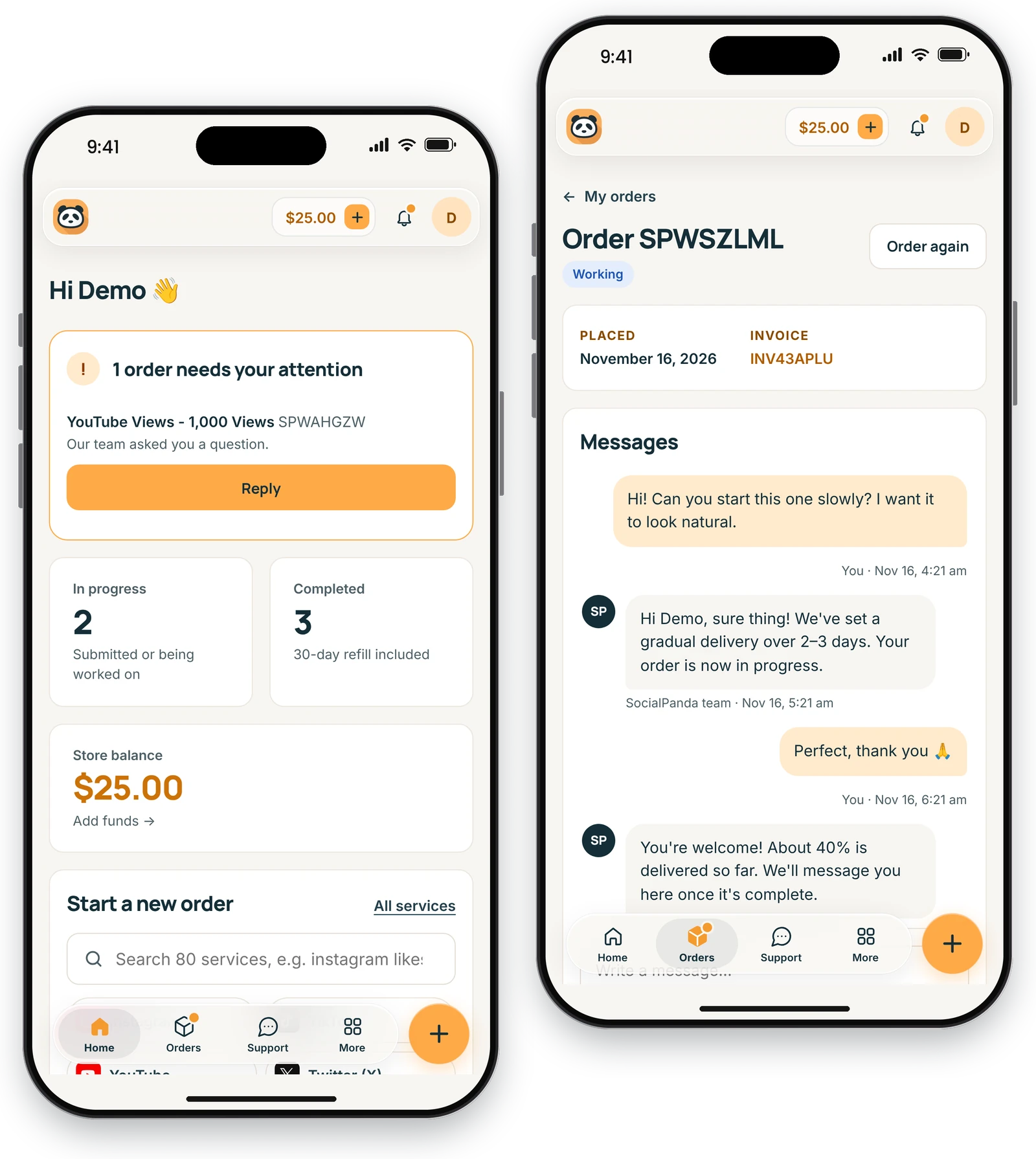
Many growth sites stop at a checkout and an email receipt. Here’s what comes with every SocialPanda order.
| Features | SocialPanda | Typical growth site |
|---|---|---|
| Your own account dashboard | Yes | Often none |
| Live status for each service | Yes | One email when paid |
| Chat with the team on the order | Yes | Contact form or email |
| Invoices with your company details | Yes, as PDF | Receipt email |
| Store balance with bonus credit | Up to 10% extra | Rarely |
| App on your phone | Yes | Rarely |
Got questions?
Your account is created automatically with your first order, using the email you enter at checkout. Next time, order with the same email and it lands in the same account.
Enter your email and we send a 6-digit code plus a one-click sign-in link, both valid for 15 minutes. You can also set a password in Profile and settings.
Yes. It works in any mobile browser, and you can add it to your home screen to open it like an app.
By card or crypto at checkout, or with your store balance if you’ve added funds.
Yes. Add your company name, billing address and tax ID in Profile and settings, and download any invoice as a PDF.
Completed orders include a 30-day refill. Open a support ticket from your account and pick the order, and our team takes it from there.

Pick a service, pay by card or crypto, and follow every order live from your own SocialPanda account.